
When choosing a new gaming PC, one of the most common questions is: How much RAM do I actually need?
With configurations offering 16GB, 32GB, 64GB and even higher memory capacities, it can be difficult to decide which option provides the best performance and value.
Is 16GB still enough for gaming? Will upgrading to 32GB improve your frame rates? And is 64GB worth the additional cost?
The answer depends on the games you play, the applications you run alongside them and how you intend to use your computer.
At XDS Computers, we believe the best gaming PC is a balanced system built around your actual requirements rather than simply choosing the highest specifications.
In this guide, we’ll explain the differences between 16GB, 32GB and 64GB RAM, explore how memory affects gaming performance and help you select the right capacity for your next gaming PC.
1. What Is RAM and Why Does It Matter for Gaming?
RAM (Random Access Memory) is your computer’s short-term working memory.
When you launch a game, your computer uses RAM to temporarily store information required by the processor and other components.
This includes game data, application information and resources needed during gameplay.
Unlike an SSD, which stores files permanently, RAM is designed for extremely fast temporary data access.
When your system doesn’t have enough available RAM, Windows may need to move some data between physical memory and your storage drive.
Although modern NVMe SSDs are fast, they’re considerably slower than system memory.
This can contribute to longer loading or application-switching times, stuttering and inconsistent performance.
However, installing more RAM than your system actually needs won’t automatically make games faster.
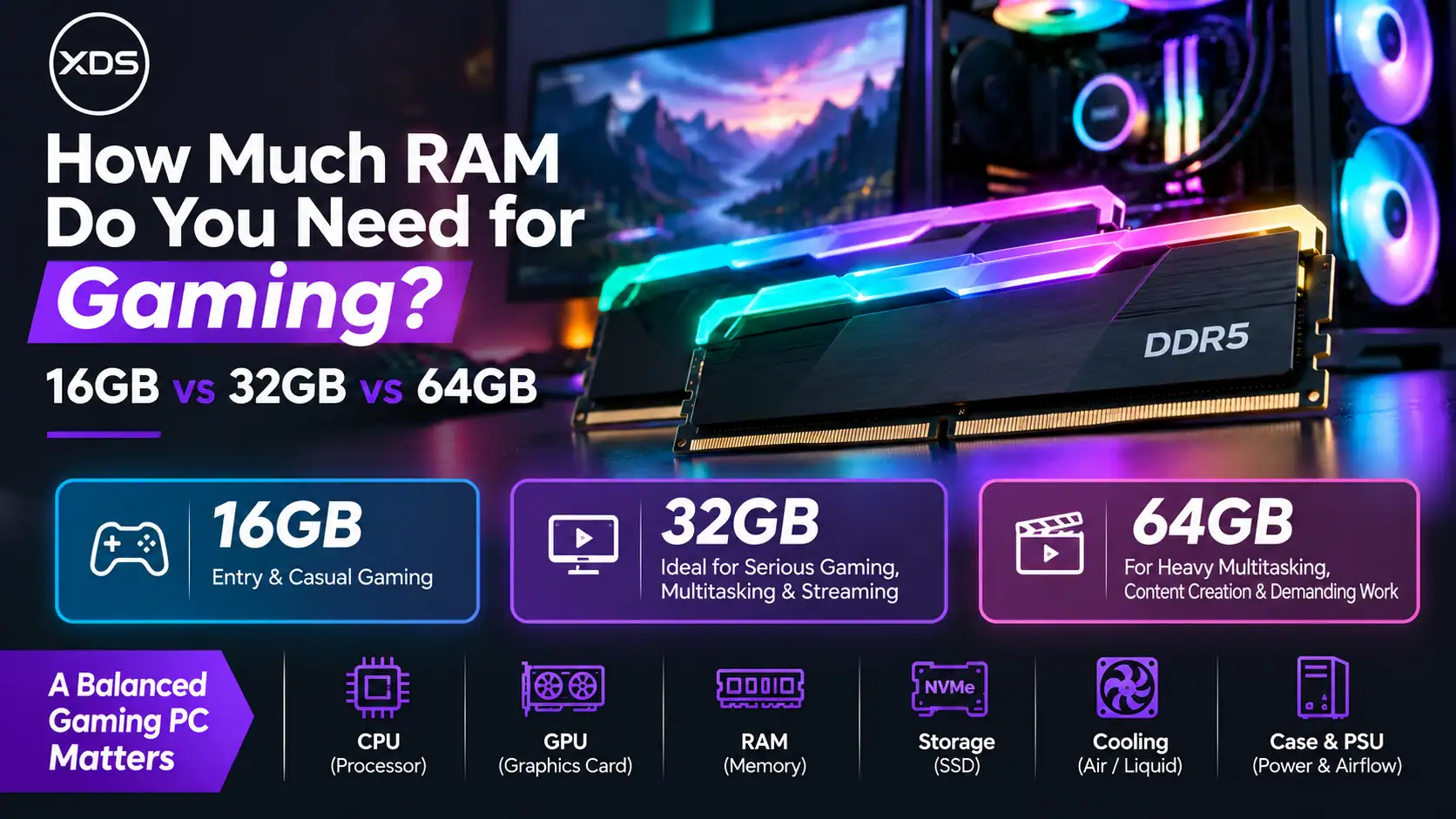
2. 16GB vs 32GB vs 64GB RAM: Quick Comparison
The ideal amount of RAM depends on how you use your gaming PC.
| RAM | Best suited for | Our assessment |
|---|---|---|
| 16GB | Casual gaming, esports, everyday computing | Good budget option |
| 32GB | Modern AAA gaming, streaming, multitasking | Best overall choice |
| 64GB | Heavy multitasking, professional creation, demanding simulations | Specialist upgrade |
For most customers purchasing a new gaming PC, 32GB DDR5 RAM offers the best balance of capacity, performance and flexibility.
However, 16GB remains a practical option for many gamers, while 64GB becomes valuable when the computer also handles demanding workloads.
3. Is 16GB RAM Enough for Gaming?
Yes. For many games, 16GB RAM is still enough to deliver a smooth gaming experience.
Popular competitive titles such as Valorant, Counter-Strike 2, League of Legends and Fortnite can run well on systems equipped with 16GB of memory, assuming the remaining hardware meets their requirements.
A 16GB configuration can be particularly attractive when building an affordable gaming PC.
It allows you to allocate more of your budget towards components such as the processor or graphics card, which may have a greater impact on gaming performance.
When Is 16GB a Good Choice?
16GB RAM makes sense if you primarily play competitive or less demanding games, don’t run many applications simultaneously and want to keep your overall system cost down.
However, certain modern games and heavily modified titles can benefit from additional memory.
You may also notice limitations if you frequently keep browsers, Discord, game launchers and other applications running in the background.
Our recommendation: 16GB is a sensible starting point for budget gaming PCs, but 32GB is worth considering for a new system intended to remain capable for several years.
4. Why 32GB RAM Is the Sweet Spot for Modern Gaming
For most new gaming PCs, 32GB is our preferred memory configuration.
It offers sufficient capacity for modern gaming while leaving additional room for background applications.
Many gamers regularly use more than just the game itself.
You might have Discord running for voice communication, several browser tabs open, monitoring software displaying system information or a game launcher operating in the background.
These applications consume memory alongside your game.
With 32GB installed, you have greater flexibility to run these programmes without putting unnecessary pressure on available RAM.
Does 32GB Improve Gaming FPS?
Not always.
If a game runs comfortably within 16GB of memory, upgrading to 32GB may produce little or no improvement in average frame rates.
However, if your system is running short of memory, additional RAM can improve frame-time consistency and reduce stuttering.
In demanding situations, this can make gameplay feel noticeably smoother.
32GB also provides useful headroom for future games, larger modifications and more demanding applications.
Best suited for: Modern AAA gaming, 1440p and 4K gaming systems, multitasking, streaming and enthusiast gaming configurations.
5. Do You Really Need 64GB RAM for Gaming?
For gaming alone, 64GB is generally unnecessary.
Most games don’t require anywhere near that amount of system memory, and installing 64GB instead of 32GB won’t automatically increase your gaming performance.
However, there are situations where 64GB becomes a worthwhile investment.
Gaming and Content Creation
If you regularly edit high-resolution video, create animations, work with complex 3D scenes or use demanding production software, additional RAM can be extremely beneficial.
Applications such as Adobe Premiere Pro, After Effects, Blender and other professional tools can consume substantial amounts of memory, depending on the project.
Heavy Multitasking
64GB can also be useful if you regularly run several demanding applications simultaneously.
For example, you might be gaming while recording gameplay, editing video, running virtual machines or working with large creative projects.
Simulation and Heavily Modified Games
Certain simulation games, extensive Minecraft modpacks, large strategy-game scenarios and heavily modified games can require more system memory than typical gaming workloads.
In these situations, additional RAM can help provide a smoother experience.
Our recommendation: Choose 64GB when you have a specific workload that benefits from it. For a dedicated gaming PC, 32GB is usually the more cost-effective option.
6. How Much RAM Do You Need for Gaming and Streaming?
Streaming introduces additional demands beyond running the game itself.
When streaming through applications such as OBS Studio, your PC may be handling gameplay, audio, video encoding, overlays, chat applications and browser-based streaming tools simultaneously.
For basic streaming setups, 16GB may still be sufficient.
However, 32GB is a more comfortable recommendation for gamers who regularly stream and multitask.
It provides additional headroom for background applications and reduces the likelihood of memory becoming a limitation.
If you also edit recorded footage, create complex streaming scenes or run demanding professional software, 64GB may be worth considering.
Remember that streaming performance also depends on your processor, graphics card and video encoder.
Adding more memory won’t compensate for insufficient CPU or GPU performance.
7. DDR4 vs DDR5: Does Memory Generation Matter?
When choosing RAM, capacity isn’t the only important consideration.
The memory generation also affects compatibility and performance.
DDR4 has been widely used in gaming PCs for many years and remains capable of delivering excellent gaming performance.
DDR5 is the newer standard used by modern AMD AM5 systems and many current Intel platforms.
Compared with DDR4, DDR5 offers higher memory bandwidth and supports faster data transfer rates.
However, DDR4 and DDR5 are not interchangeable.
Your processor and motherboard must support the memory type you select.
For example, AMD Ryzen 7000 and Ryzen 9000 desktop processors using the AM5 platform require DDR5 memory.
If you’re purchasing a new AMD Ryzen AM5 gaming PC, DDR5 is the appropriate choice.
8. RAM Speed: Is Faster Memory Always Better?
RAM speed can influence system performance, particularly in certain CPU-sensitive games and workloads.
DDR5 memory is available at different data rates, commonly including 4800MT/s, 5600MT/s, 6000MT/s and higher.
Faster memory can improve performance in some situations, but the benefits depend on your processor, motherboard and software.
Memory latency also matters.
For example, a DDR5-6000 CL30 kit has different latency characteristics from a DDR5-6000 CL40 kit, even though both operate at the same data rate.
For many AMD Ryzen AM5 gaming systems, DDR5-6000 is a popular performance-oriented option, provided the processor and motherboard can operate reliably with the selected memory kit.
AMD EXPO and Intel XMP memory profiles can help configure supported memory kits, but advertised speeds are not guaranteed on every system.
When choosing memory, stability and compatibility should take priority over selecting the highest advertised speed.
9. Why Two RAM Modules Are Often Better Than One
Another important consideration is how your memory capacity is arranged.
For example, 32GB can be installed using either one 32GB module or two 16GB modules.
In most mainstream dual-channel gaming systems, using two compatible modules allows the processor to access memory through both channels.
This can improve memory bandwidth compared with a single-module configuration.
Common choices include:
- 16GB: 2 × 8GB
- 32GB: 2 × 16GB
- 64GB: 2 × 32GB
Using two memory modules is often preferable to filling all four motherboard slots, particularly when targeting higher DDR5 speeds.
Four-module configurations can place additional demands on the processor’s memory controller and may require lower operating speeds.
The ideal configuration should always be checked against motherboard and processor compatibility.
10. Why the Complete Gaming PC Configuration Matters
One of the biggest mistakes when buying a gaming PC is focusing too heavily on a single component.
Installing 64GB of expensive RAM won’t necessarily improve gaming performance if your graphics card or processor is the actual limitation.
A well-balanced gaming PC should consider several components together.
Processor (CPU)
Your processor influences game logic, simulation performance and maximum achievable frame rates.
For high-refresh-rate gaming, a capable AMD Ryzen or Intel Core processor is particularly important.
Graphics Card (GPU)
Your graphics card has a major influence on gaming performance, especially at 1440p and 4K.
For example, a system with 32GB RAM and a stronger GPU may outperform a 64GB system equipped with a significantly weaker graphics card.
Graphics Memory (VRAM)
RAM and VRAM are different.
System RAM supports your CPU and applications, while dedicated graphics cards use VRAM for graphics-related workloads.
Having insufficient graphics memory can increase pressure on system RAM, especially in demanding games.
SSD Storage
A fast NVMe SSD helps improve game loading and general system responsiveness.
However, adding more RAM doesn’t replace the benefits of having sufficient fast storage.
Motherboard and Cooling
Your motherboard determines supported memory technologies, configurations and expansion options.
Effective cooling also helps the processor and graphics card maintain reliable performance during demanding gaming sessions.
The most important principle is balance: Select enough RAM for your workload, then allocate the remaining budget towards the components that will most improve your overall experience.
11. How to Choose RAM Using the XDS PC Configurator
At XDS Computers, we make it easy to customise your gaming PC according to your requirements.
Our gaming PC configurator includes a dedicated Memory (RAM) section where you can explore available memory options.
You can narrow your selection using filters such as:
- Memory Capacity: Choose the amount of RAM that suits your gaming and multitasking needs.
- Memory Speed: Explore available memory data rates.
- Memory Lighting: Choose between RGB and non-RGB memory modules.
For an affordable gaming configuration, 16GB may be sufficient.
For a powerful everyday gaming PC, we generally recommend 32GB DDR5.
For gaming combined with professional content creation or demanding workloads, consider 64GB where appropriate.
Once you’ve selected your memory, review the remaining components and overall specification before proceeding with your order.
Frequently Asked Questions
Is 16GB RAM enough for gaming in 2026?
Yes. Many modern games still perform well with 16GB, although some demanding titles and multitasking situations benefit from additional memory.
Is 32GB RAM worth it for gaming?
For most new gaming PCs, yes. It provides useful headroom for demanding games, background applications and future requirements.
Will 64GB RAM increase my FPS?
Not necessarily. If your games and applications already fit comfortably within 32GB, upgrading to 64GB generally won’t provide a meaningful gaming performance improvement.
Does 4K gaming require more RAM?
Not automatically. Higher resolutions primarily increase graphics card workload and VRAM requirements. System RAM needs depend more on the game, background applications and overall configuration.
Is 32GB DDR5 better than 64GB DDR4?
The answer depends on the processor, motherboard and workload. DDR5 offers higher bandwidth, while 64GB provides greater capacity. For gaming that doesn’t need more than 32GB, a modern DDR5 system may be more attractive, but the full configuration must be compared.
Final Verdict: 16GB, 32GB or 64GB?
Choosing the right amount of RAM doesn’t need to be complicated.
16GB RAM remains a capable option for affordable gaming PCs and users who primarily play less demanding games.
32GB RAM is our recommended choice for most new gaming systems, offering a strong balance between capacity, performance and everyday flexibility.
64GB RAM is best suited to enthusiasts who combine gaming with demanding content creation, simulations or intensive multitasking.
Ultimately, the best memory configuration is the one that complements your entire gaming PC.
Configure Your Gaming PC with XDS Computers
At XDS Computers, we specialise in custom-built gaming PCs designed around individual requirements and budgets.
Whether you’re building an affordable Ryzen gaming system, a powerful Intel gaming PC or a high-end workstation capable of gaming and content creation, we can help you select the right components.
Our custom-built systems are professionally assembled and tested, with comprehensive hardware warranty and support.
Ready to build your next gaming PC?
Explore and Configure Your Gaming PC with XDS Computers
Choose the right memory. Balance your components. Enjoy a gaming PC built for your needs.